The pipeline on one page
The full diagram, end to end. Problem framing on the left, post-ship learning loop on the right. Every artifact in the middle has a citation back to the brief that spawned it.
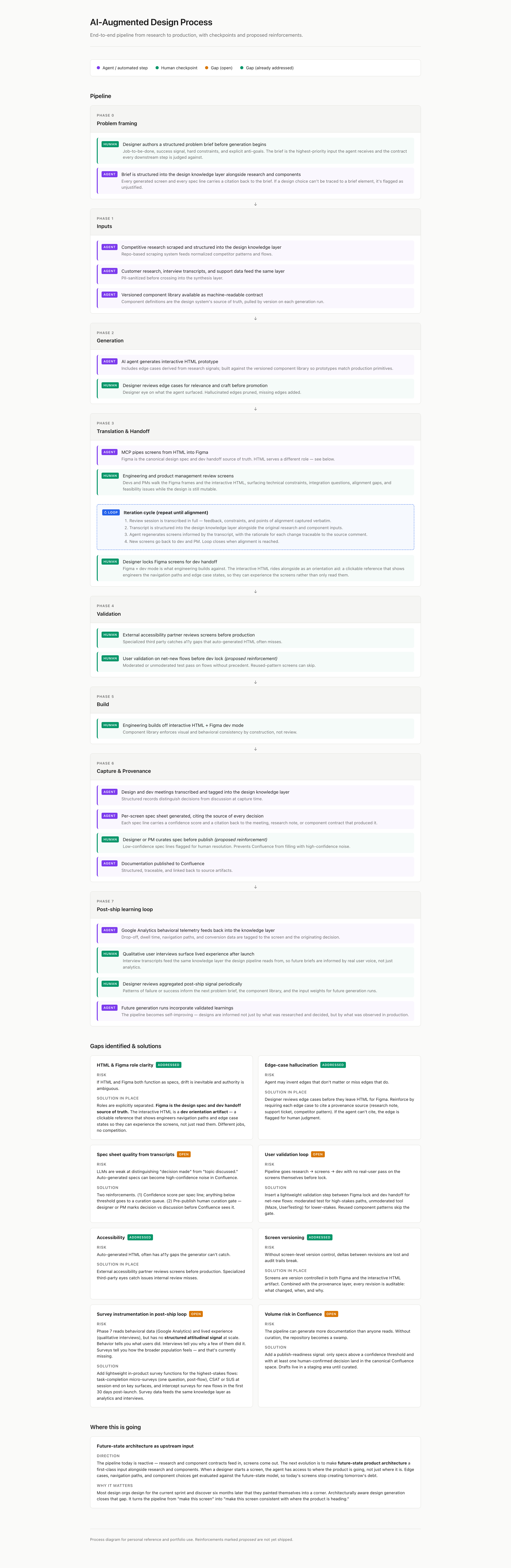
Companion piece to Case 02. The walkthrough below is mocked into a neutral domain — a document review workflow — for confidentiality. The architecture, phases, and outputs mirror what we run inside the real product.
Eight folders feed the agent its working knowledge, governed by a single
CLAUDE.md
that defines retrieval rules, scope, and which folder owns what kind of decision.
The last folder solved a real visibility gap. We couldn't see how customers were configuring our white-label deployments, so I had the agent build a compliant scraper (run inside our legal team's guardrails) to surface deployment patterns and emerging feature requests we'd otherwise miss. That folder fed every subsequent design decision.
Each run moves through six phases. Outputs from earlier phases are cited explicitly by later phases, so every artifact carries provenance back to the problem brief that spawned it.
Reads current UI screens, the live production site, and recent meeting context.
Pulls competitor patterns: navigation, hierarchy, density, empty/error states, mobile UX. Flags components missing from our library.
Uses the screen-builder rules, component snippets, and the CSS token system. Builds HTML from tokens and approved components only.
WCAG 2.2 audit before delivery. Surfaces violations with remediation guidance.
Final HTML + assets, ready for dev review and Figma round-trip.
Every choice ties back to phase 1–2 evidence. Misuses become hard rules the next run can't violate.
The full diagram, end to end. Problem framing on the left, post-ship learning loop on the right. Every artifact in the middle has a citation back to the brief that spawned it.
The pipeline above describes a single run. The compounding value comes from what happens between runs.
After delivery, designers review the screens and write feedback into a
lessons.md file — one per product. The screen builder reads that file at
the start of every subsequent run. Misuses, edge cases we missed, components used
out of context, accessibility gaps caught in review — all of it accrues into a
per-product memory the agent has to honor on the next pass.
The compounding effect is the point. Run one is competent. Run twenty is shaped by twenty rounds of designer judgment. The agent isn't getting smarter — the codified design intent around it is.
Below: the agent generated three states for a Document Review screen — drawing only from approved components and the documented edge cases.
The agent generated each variant from the same component vocabulary. Edge cases came from documented scenarios, not improvisation.
Banner / informational for the read-only state. Source: competitor-breakdowns/permissions-patterns.md, lines 14–22.--status-pending-amber-300, --status-active-blue-400, --status-approved-green-400. No new tokens introduced.